Ultrahuman’s Partner API enables approved apps to read user-consented data via OAuth 2.0. This page outlines essentials for planning and implementation.
You can read the full documentation for OAuth and API implementation here .
How it works
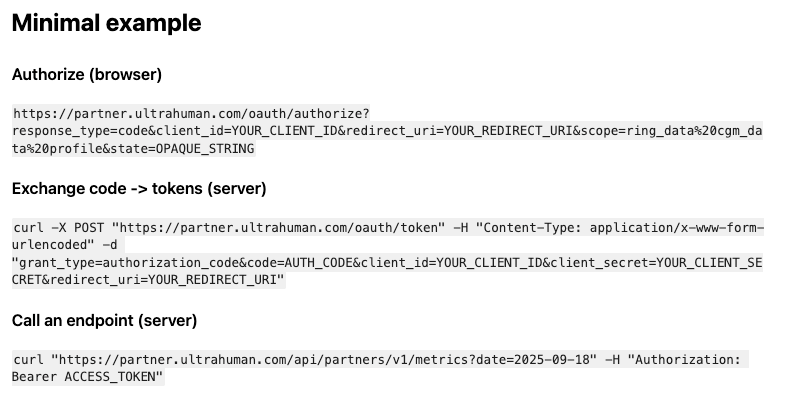
- User signs in and approves requested scopes.
- Your app receives an authorization code.
- Your server exchanges the code for an access token and a refresh token.
- Call Partner endpoints with Authorization: Bearer ACCESS_TOKEN.
- When the access token expires (about one week), refresh and continue.
Prerequisites
- Client ID and Client Secret (partner onboarding)
- Redirect URI (must exactly match the registered value)
- Base URL
https://partner.ultrahuman.com - Scopes
ring_data,cgm_data,profile(request only what you need)
Available data
Access depends on user consent and scopes.
Ring / recovery
- Sleep data
- Movement data
- Steps
- Heart rate
- HRV
- Temperature
- VO2 Max
- Recovery Index
- Movement Index
- Metabolic Score
CGM / metabolic
- Glucose
- Average glucose (mg/dL)
- Glucose variability (%)
- HbA1c
- Time in target (%)
Profile
- Basic user profile data
Implementation notes
- Perform token exchanges on the server.
- Store secrets and refresh tokens securely.
- On 401, refresh and retry once.
- Keep scopes minimal (least privilege).
- Many endpoints are date-based (YYYY-MM-DD).
THE AUTHOR