Updated Nov 2026
Try our sizers, sizes 5 to 14, on your index, middle and ring fingers, and pick the one that sits snug at the base. Wear it for two nights, then submit that size in the Ultrahuman App.
What’s in the sizing kit?
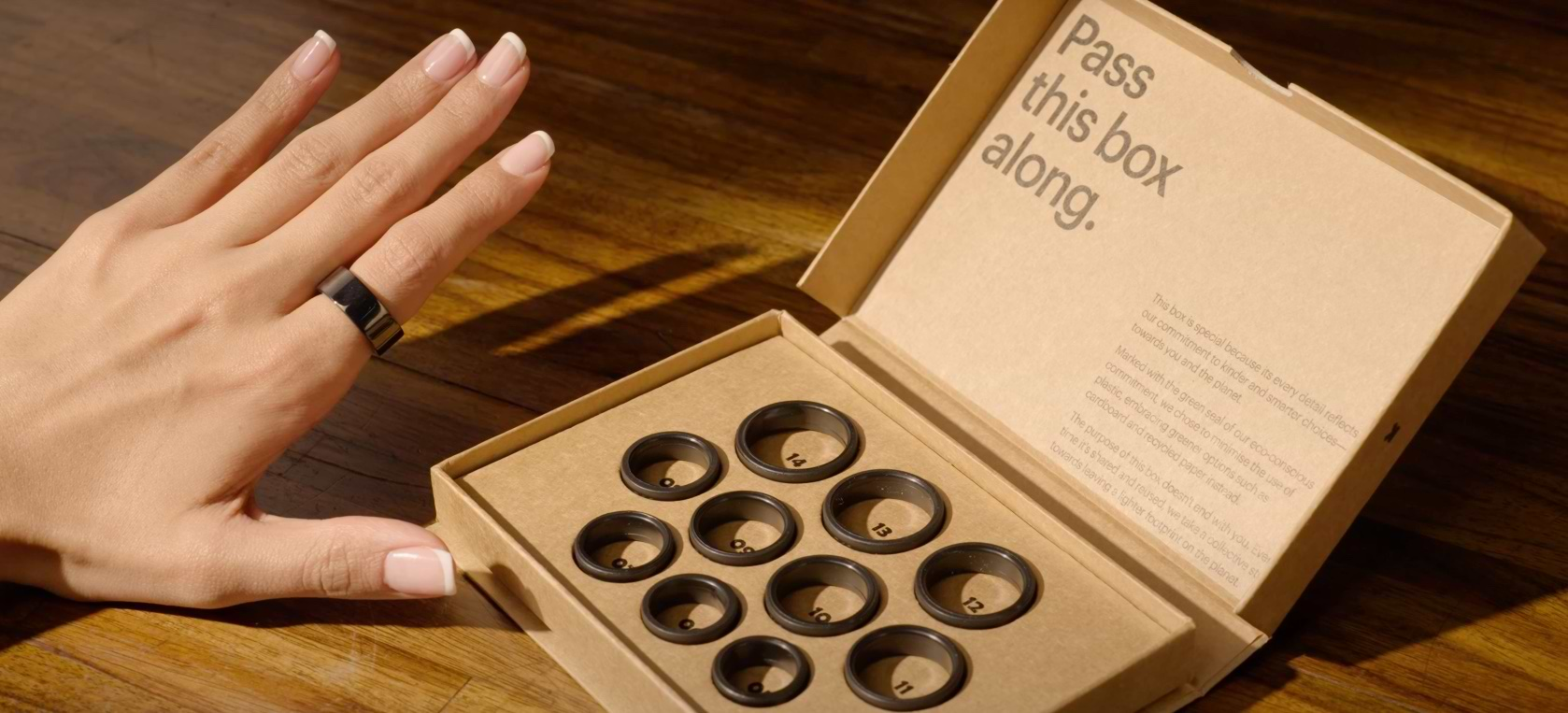
Your free kit has 10 plastic sizers in sizes 5 to 14, each marked with its size, plus a QR code for submitting your size. One kit works for Ring AIR and Ring PRO, so your Ring AIR size carries over.
Our sizes differ from jewellery sizes and other smart rings, so test with the kit even if you know your usual size.
Why sizing matters
Your ring tracks your body through optical sensors on its inner surface, so they need constant contact with your skin. A loose fit lets light leak in, which leaves gaps in your data. A ring that’s too tight feels uncomfortable and can affect sensor accuracy.
Which finger should you wear your Ultrahuman Ring on?
We recommend your index, middle or ring finger, on either hand. The index finger often gives the best sensor data, but the most comfortable snug fit decides.
- Avoid your thumb and little finger.
- Skip fingers with large knuckles, which can distort sizing. The knuckle and base should be a similar size.
- A dark, heavy tattoo under the sensors can affect readings, so pick an untattooed finger if you can.
Three steps to choosing your ideal size
1. Choose your finger
Shortlist your index, middle and ring fingers on both hands, then try a few sizes on each.
2. Check the fit
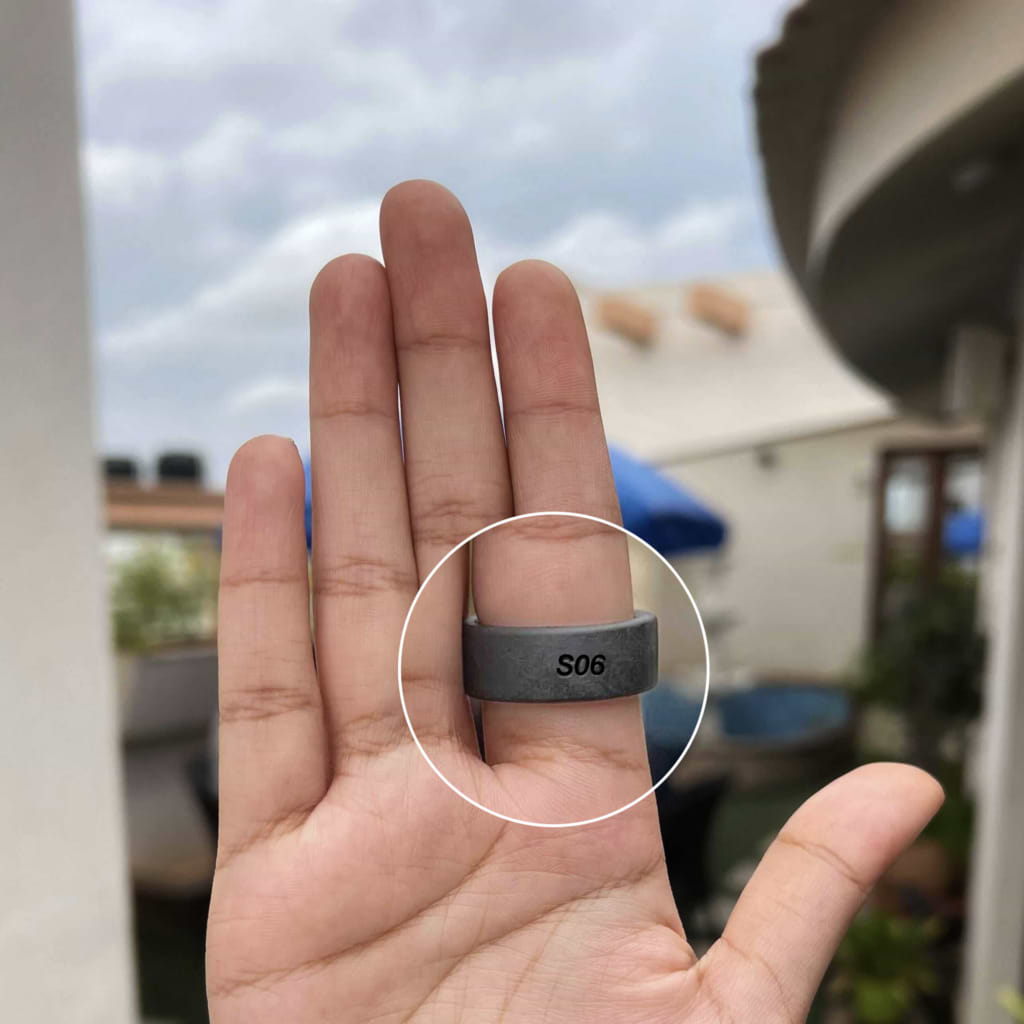
- The sizer sits snug at the base of your finger.
- The size number faces your palm. That’s where the sensor ridge sits on your real ring.
- When you twist it, your skin moves with it.
- It’s too loose if it spins or slides, and too tight if it hurts or is hard to remove.
- If it feels right, still try one size up and one size down.
3. Wear for two nights
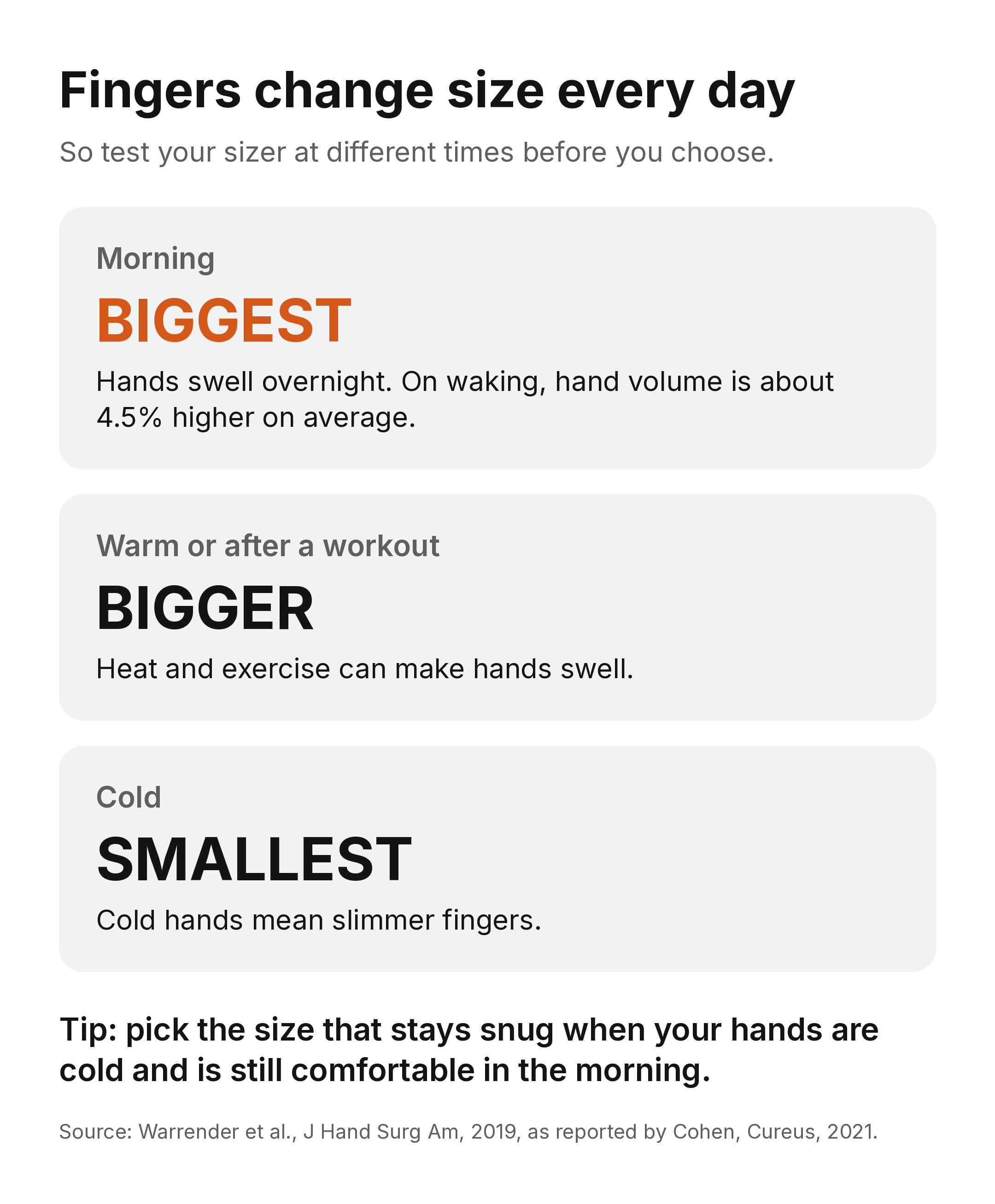
Wear your chosen size for at least two nights. Check it in the morning, in the evening, during a workout and in bed.
Your fingers change size with temperature, fluid, activity and your menstrual cycle. They’re biggest when you wake up and slimmest when your hands are cold. A size that fits snugly on two fingers lets you switch later.
Still unsure? Try these tips
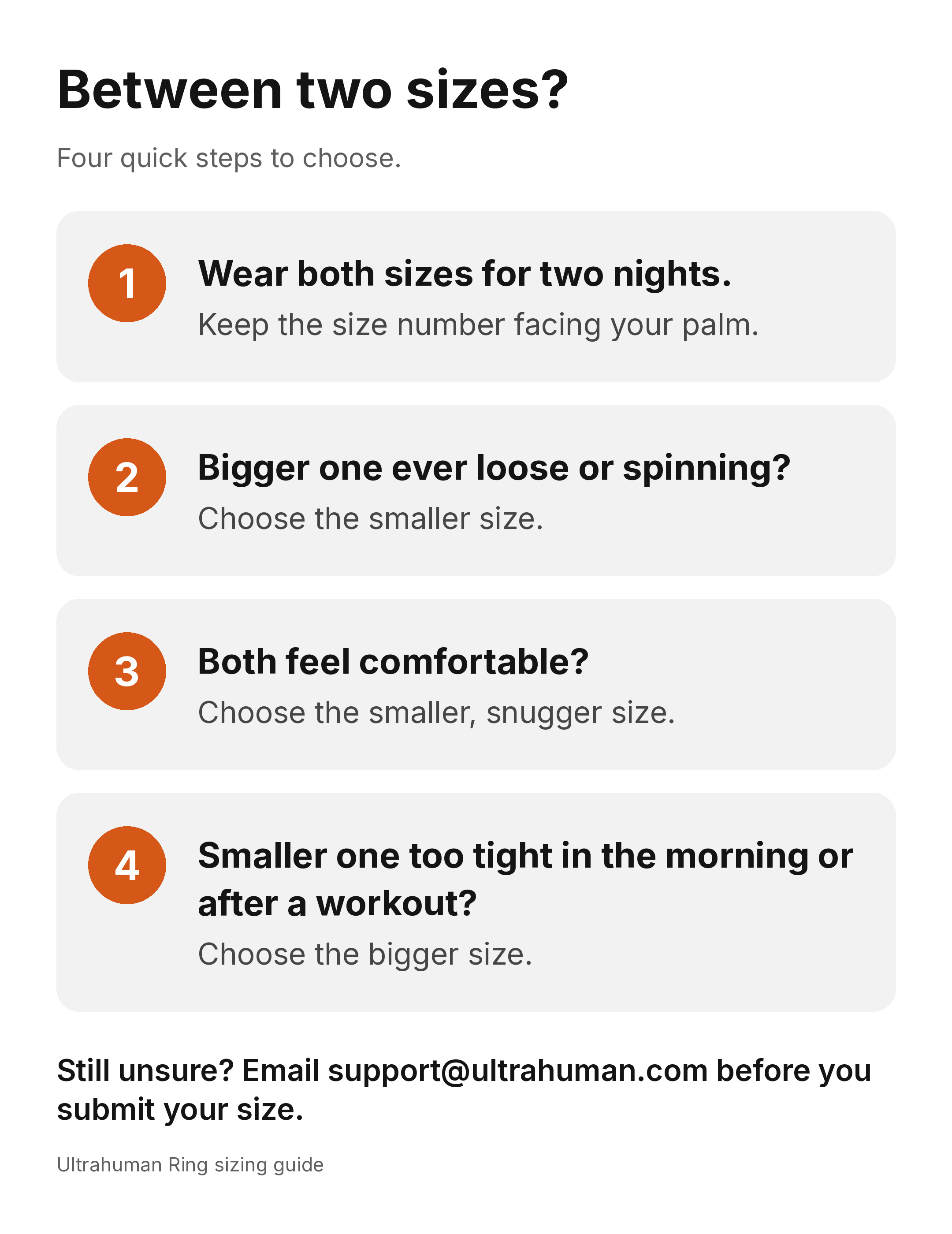
If you’re between two sizes, wear both for two nights and choose the snugger one if both feel comfortable. We only make whole sizes, so you can’t split the difference with a half size.
- Bigger size loose at any point? Go smaller.
- Both comfortable? Go with the snugger size.
- Smaller size tight in the morning or after a workout? Go bigger.
- Still torn? Choose the size that fits more than one finger.
If you’re still stuck, email support@ultrahuman.com before you submit your size in the app.
Ultrahuman Ring size chart
We make the Ultrahuman Ring in whole sizes from 5 to 14, with no half sizes. The free sizing kit is the way to find yours.
| Sizing | Details |
|---|---|
| Ultrahuman Ring sizes (Ring AIR and Ring PRO) | 5, 6, 7, 8, 9, 10, 11, 12, 13 and 14 |
| Half sizes | No |
| How to find yours | Free sizing kit, worn for two nights |
If you’re looking for sizes in mm, conversions from jewellery or other smart ring charts won’t match ours, so use the free kit instead.
Final sizing checklist
- Sizer fits snugly at the base of your finger
- Size number faces your palm
- Skin moves with the sizer when you twist it
- Still snug and comfortable after two nights
How to submit your sizing preference
- Update the Ultrahuman App to the latest version.
- Scan the QR code inside your sizing kit.
- Log in with the same email you used to order.
- Follow the sizing steps in the app.
- Choose your colour in the same step, using the photos of each finish.
Can’t find your order in the app?
Try these steps:
- Tap the option to transfer your order to your current login email.
- Log in using your Apple or Gmail ID.
- Go to the “Ring” tab.
- Tap “Not able to see your order” and follow the prompts.
How to wear your Ultrahuman Ring
Wear the ring with the sensor ridge, the small bump inside, facing your palm. To take it off, push it up from underneath and slide it out.
Calibration takes up to 14 days, so wear it day and night from the start. Our getting started guide walks through pairing and setup in the app.
If your ring feels stuck
Run your hand under cold water, add a little soap, and twist gently as you pull. Raising your hand above your heart for a few minutes also helps.
If it still won’t come off, get medical help and don’t try to cut it yourself. If you wear Ring PRO, tell them it has a dedicated cut zone so they can remove it safely.
Changing your size and returns
You can change your size within 3 days of submitting it, or until your order ships, whichever comes first. Email support@ultrahuman.com to make the change.
- Returning Ring PRO in the US? Send it back within 30 days of delivery, with the charger and accessories in the original box. Return shipping is free.
- Returning elsewhere? Our returns FAQ covers the 30-day window, and we pay return shipping, even internationally.
No kit? Other ways to find your size
We recommend the sizing kit, but there are three other options if you don’t have one.
- Print one. Download our files to 3D print a sizing kit . Use a resin printer (SLA, LCD or DLP) at its highest resolution.
- Borrow one. A friend’s kit works fine. Just submit your size with your own email and order.
- Gift one. A gift sizing kit lets the person you’re buying for choose their own size and finish.
In the US, Best Buy stocks Ring PRO but not sizing kits, so find your size before you go.
Sizing kit FAQ
What is the Ultrahuman Ring Sizing Kit?
It’s a free set of 10 plastic sample rings, sizes 5 to 14, for finding your fit before we make your ring. The same kit works for Ring AIR and Ring PRO.
Why is sizing important?
A loose ring can spin, slide off or leave gaps in your data, because the sensors need constant skin contact. A tight one gets uncomfortable over long wear.
Which finger should I wear the ring on?
Your index, middle or ring finger, on either hand. The index finger often gives the best data, but choose whichever feels snug and comfortable.
How tight should a smart ring be?
It should feel snug but not tight, without spinning freely, and take a little effort to remove. If it ever hurts or feels uncomfortable overnight, try the next size up.
How do I use the sizing kit properly?
Wear each sizer with the number facing your palm, then wear your favourite for two nights, checking it in the morning, evening, during a workout and in bed.
What if I’m between two sizes?
Wear both for two nights and choose the snugger one if both feel comfortable. If the bigger one ever feels loose, choose the smaller size.
Can I test multiple fingers?
Yes. Try different fingers on both hands, since a size that fits two of them gives room to switch later.
Do I return the kit?
No, the kit is yours to keep. You can also share it with friends so they can find their size too.
How do I submit my ring size?
Scan the QR code in your kit and log in to the Ultrahuman App with your order email. Then confirm your size and colour, and we’ll ship your ring.
Can I change my size after submitting?
Yes, within 3 days of submitting it or until your order ships, whichever comes first. Email support@ultrahuman.com to change it.
What happens after I submit my size?
We make your ring in the size and colour chosen, then ship it, with delivery times depending on the country.
Is the sizing ring identical to the final product?
The fit should be the same if you tested properly, but the plastic sizer is lighter than your metal ring.
Why does my actual ring feel slightly different from the test ring?
Temperature, humidity, hydration and time of day all change your finger size slightly, so the two-night test matters.
What if I lose the sizing kit?
Email support@ultrahuman.com and we can usually send another one, though charges may apply.
Can I use someone else’s kit?
Yes, as long as you submit your size with your own email and order details.
Is the sizing process different for men and women?
No, sizing works the same for everyone, so test with the kit rather than guessing from averages.
THE AUTHOR